
Snapchat
Snap IncCommunication
4.21.78M Reviews
- Version
- 14.29.0.50
- Installs
- 1.00B
- Age Rating
- Teen
Screenshots


Our Review of Snapchat
 Analysis by Appyee
Ever found yourself scrolling through your phone, wondering what app could add a little more spice to your social media game? Well, let me tell you about Snapchat. This app isn’t just another social networking platform; it brings a playful twist to how we share our lives with friends and family.
Who gets the most from a camera-first social app?
That camera-first approach is the clearest reason to try Snapchat, but it also explains why it will not suit everyone. I find it most useful when the people I want to talk to are already there and are happy to share small, casual moments rather than polished updates. A silly picture from a walk, a quick reaction to a friend’s message, or a brief glimpse of a meal can feel more natural here than composing a post for a broad audience.
Snapchat is a communication app from Snap Inc, and its appeal is less about replacing every social tool on a phone than giving friends a low-pressure way to interact. The app is free to download, though it includes optional in-app purchases, with individual items ranging from around fifty cents to nearly four hundred dollars. That wide range is a reason to check what a purchase actually offers before paying; the core idea of sending Snaps does not require treating every optional offer as essential.
For context, the app has been around since 2012, has passed a billion installs, and holds an average rating of 4.2 from around 39 million ratings. Those figures suggest that it has become a familiar part of many people’s social routines, but popularity does not make it the right fit for every circle of friends. Its Teen content rating is also worth keeping in mind when deciding whether it is appropriate for a younger user; families should discuss privacy, contacts, and sharing habits rather than relying on an age label alone.
First Impressions
So, I downloaded Snapchat out of sheer curiosity. The app has a sleek interface, instantly grabbing your attention with a camera view as soon as you open it. It’s like the app is saying, “Hey, go ahead, snap something fun right now!”
Setting up was a breeze. Just create an account or log in, and you’re ready to dive into the world of Snaps, Stories, and Streaks. The app encourages you to start snapping away, and trust me, it’s pretty hard to resist.
The Fun Begins
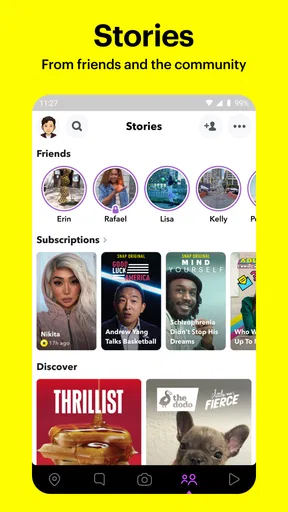
The magic of Snapchat lies in its ephemeral nature. Whatever you snap, it’s gone in a flash unless saved or screenshotted. This impermanence is what makes it so addictive. You’ve got your Snaps, which are direct messages you send to friends, and then there are Stories, which are visible to all your friends for 24 hours. It’s a great way to keep everyone in the loop with what’s happening in your life without the permanence of other social networks.
That disappearing quality is useful for everyday conversation, but I would never treat it as a guarantee of privacy. A recipient can capture what appears on their screen, and a moment shared digitally can travel beyond its intended audience. I use Snaps for things I am comfortable sharing with the people I chose, not for sensitive details or anything I would regret being saved. If a message needs a lasting record, a more conventional chat or a deliberate saved copy is the safer workflow.
A practical habit is to decide who should see a moment before sending it. A quick one-to-one Snap suits a private joke, while a Story makes more sense for a small update meant for several friends. The audience choice matters more than the playful format: sending the same image to a broad group can feel very different from sharing it with one person. I also avoid sending a Story simply because the app makes posting easy; a little selectiveness keeps the feed from becoming noise for friends.
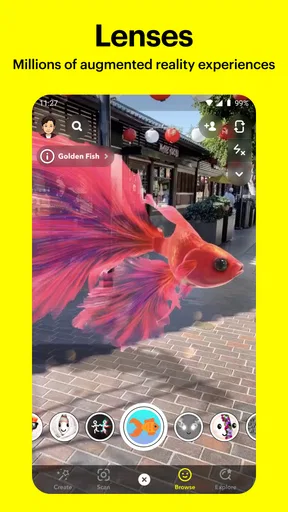
And let’s not forget the filters! Oh man, these are the game-changers. From turning yourself into a puppy to trying out the latest fashion trends, filters keep things fresh and entertaining. It’s like having a mini photo booth right in your pocket.
Making the camera work for you
The strongest use of the camera is not necessarily making every image elaborate. I get more out of it when a filter or effect adds a quick joke or helps express a mood, then I send the result and move on. If I spend too long browsing options, the spontaneous moment that made me open the camera can disappear. A useful rule is to take the picture first, then decide whether an effect improves it; that keeps the feature playful rather than turning a quick exchange into a search session.
This is also where Snapchat differs from the usual alternatives. Instagram and similar social platforms tend to make a photo feel like a post for a wider audience, while a Snapchat exchange often feels aimed at a particular friend or small group. Traditional messaging apps are better when the priority is a dependable, organized conversation, but they generally do not put a playful camera experience at the center in the same way. I would keep both kinds of tools if my friends were split between them instead of trying to force everyone into one app.
Exploring Features
There’s so much more under the hood than just sending pics. Discovering the ‘Discover’ section opens up a whole new world of content from publishers and creators. It’s like flipping through a magazine, but way cooler and tailored to your interests.
For me, Discover works best as a separate browse rather than something I open when I only want to reply to a friend. It can be an easy way to fill a spare moment, but switching between personal messages and publisher or creator content can make the app feel busier than a straightforward messenger. If I want to catch up with one person, I go directly to that conversation; if I want to browse, I give myself time to do that without letting the feed interrupt the original reason I opened the app.
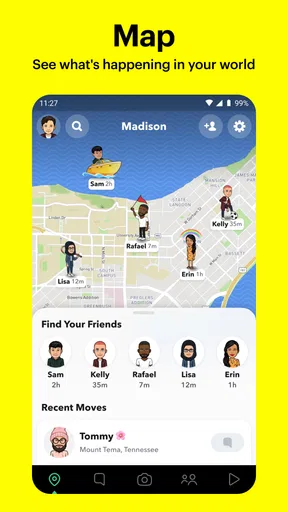
And then there are Snap Maps. You can see where your friends are hanging out or even explore what’s happening around the globe. It’s a neat feature, although it might feel a bit intrusive if you’re big on privacy.
Location sharing deserves a deliberate choice, not a casual tap-through. Before using the map, I would review who can see my location and whether sharing it fits the situation. It may be convenient when friends are coordinating a meetup, but it is not necessary for enjoying the camera, Stories, or direct chats. If location visibility makes you uneasy, skip that part and use the rest of the app without making the map central to your routine.
A realistic day with Snapchat
Imagine meeting a friend after work: you send a quick Snap of the crowded café entrance, then a short message to say which side you are waiting on. Later, you share a brief Story from the table for the friends who enjoy those little updates, without turning the evening into a carefully edited public post. That is the kind of ordinary use where the app feels coherent: the camera captures the moment, direct messages handle coordination, and the Story shares a wider but temporary glimpse.
The same workflow can become less convenient if the group has not adopted Snapchat. You may end up sending the update elsewhere anyway, and maintaining a Streak can feel like a chore if daily Snaps are not already part of the friendship. I treat Streaks as a game, not proof of closeness. If keeping one starts to dictate when I use my phone, I would rather let it lapse than make a friendship feel like a daily task.
Staying Connected
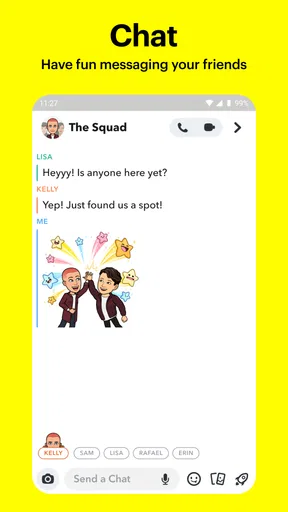
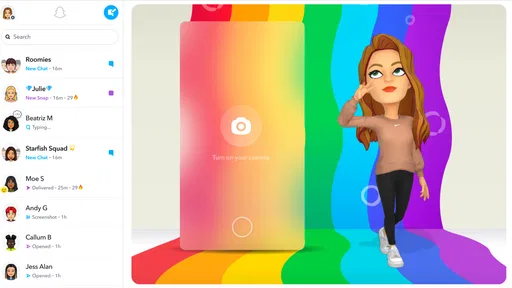
Snapchat excels in keeping you connected with friends. The concept of Streaks - continuous days of sending Snaps back and forth - becomes a fun challenge and a way to maintain connections. Plus, the direct messaging feature is simple yet effective, allowing for quick chats or video calls.
One trade-off is that a camera-led interface can make basic communication feel less direct than opening a conventional chat app. Someone who mainly needs searchable conversations, careful message organization, or a long-running record may prefer a standard messenger. Snapchat is at its best when the exchange is visual and informal; it is less compelling as a place to manage important plans or preserve information you will need to find later.
What really stands out is how Snapchat encourages creativity and spontaneity. It’s not just about perfectly curated images; it’s about capturing the moment as it is, raw and real.
That spontaneity is a strength, but it can also pull attention toward constant checking. Notifications, ongoing chats, and the urge to maintain a Streak can make a light social app feel like an obligation. I would set a personal boundary around when I check it, especially if I only want to use the camera and messages rather than follow every update. The app can support quick connection, but it cannot decide how much attention that connection deserves.
Compatibility, spending, and expectations
The current version is 13.95.0.44, and the stated minimum operating-system requirement is Android 6.0. That makes it useful to check device compatibility before installing, particularly on an older phone. The experience is built around taking and viewing visual content, so a device that feels slow when opening the camera or moving between screens may make the app less enjoyable even if it meets the basic requirement.
Although Snapchat is free, optional purchases can appear within the app. I would approach those as extras rather than prerequisites and check the item and its cost carefully before confirming anything. If your goal is simply to exchange casual photos, messages, and Stories, the main appeal is the social habit you build with friends, not spending money on add-ons.
Another question is whether a new user can enjoy it without posting constantly. Yes: the app can be used mainly for direct messages and occasional Snaps, and there is no need to make every day a performance. It becomes more rewarding when a few friends actively use it, though. If your contacts prefer another messaging service, Snapchat may sit unused regardless of its features, so I would ask a couple of friends whether they are already there before making it your main communication channel.
Final Thoughts
Overall, Snapchat isn’t just another app on the block. It’s a dynamic platform that encourages creativity, connection, and a bit of fun. Whether you’re a social media aficionado or just someone looking to share moments with friends, Snapchat offers something unique. So, why not give it a try and see what all the snapping fuss is about?
My recommendation is specific: try it if you have friends who enjoy quick visual conversations and you like sharing unpolished moments. Keep location sharing and audience choices intentional, and do not rely on disappearing messages for sensitive communication. If you want a quieter, text-first tool or a dependable archive, another messenger will likely serve you better. For the right group, though, Snapchat makes everyday exchanges feel more playful without requiring every moment to become a permanent post.
Privacy and Permissions
See what permissions an app requests and how it handles your data.
- Identity
- find accounts on the device, read your own contact card
- Contacts
- find accounts on the device, read your contacts, modify your contacts
- Location
- precise location (GPS and network-based)
- Phone
- read phone status and identity
- Photos/Media/Files
- read the contents of your USB storage, modify or delete the contents of your USB storage
- Storage
- read the contents of your USB storage, modify or delete the contents of your USB storage
- Camera
- take pictures and videos
- Microphone
- record audio
- Wi-Fi connection information
- view Wi-Fi connections
- Device ID & call information
- read phone status and identity
- Other
- view network connections, create accounts and set passwords, pair with Bluetooth devices, access Bluetooth settings, change network connectivity, connect and disconnect from Wi-Fi, control flashlight, full network access, change your audio settings, read sync settings, run at startup, control vibration, prevent device from sleeping, toggle sync on and off
Verdict
Strengths of Snapchat
- User-friendly interface for quick navigation.
- Fun AR filters enhance photo creativity.
- Real-time location sharing with friends.
- Stories feature keeps content fresh.
- Strong privacy settings for secure use.
Limitations of Snapchat
- Drains battery quickly during use.
- Notifications can be overwhelming.
- Limited video call quality.
- Discover content can be irrelevant.
- Requires constant updates for new features.
Similar Picks in This Category
View All
Google Messages
Google LLC4.6

Gmail
Google LLC4.1

Google Meet
Google LLC4.4

Google Chrome
Google LLC4.1

WhatsApp Messenger
WhatsApp LLC4.6

Carrier Services
Google LLC4.2
You May Also Like
View All


Frequently Asked Questions
What is Snapchat and how does it work?
Snapchat is a multimedia messaging app where users can send photos, videos, and messages that disappear after being viewed. Users can also create Stories, which are collections of Snaps viewable by friends for 24 hours. Snapchat includes features like filters, lenses, and various interactive elements that enhance user engagement.
Is Snapchat safe for kids and teenagers?
Snapchat can be safe for older teens, but it requires parental guidance. The app has privacy settings that can restrict who can contact the user or view their content. Parents should discuss online safety and privacy with their children, ensuring they understand the implications of sharing personal information and images.
What are Snapchat’s privacy features?
Snapchat offers several privacy features, including the ability to control who can view your Story, send you Snaps, or see your location on the Snap Map. Users can also block or report others for inappropriate behavior. Snapchat’s ephemeral nature provides an additional layer of privacy, as most content disappears after viewing.
How does Snapchat’s Snap Map work?
Snap Map allows users to share their location with friends or view friends’ locations. It’s an opt-in feature, meaning you can choose whether to share your location. Users can also enable Ghost Mode to hide their location. It’s important to use this feature cautiously and be mindful of privacy concerns.
Can I use Snapchat on multiple devices?
Snapchat is primarily designed for use on one device at a time. If you log in on a new device, you’ll be logged out from the previous one. This helps maintain account security. Users should ensure their login credentials are secure and enable two-factor authentication for added protection.
